GitOps in Action: How Argo CD Image Updater Deploys New Container Images
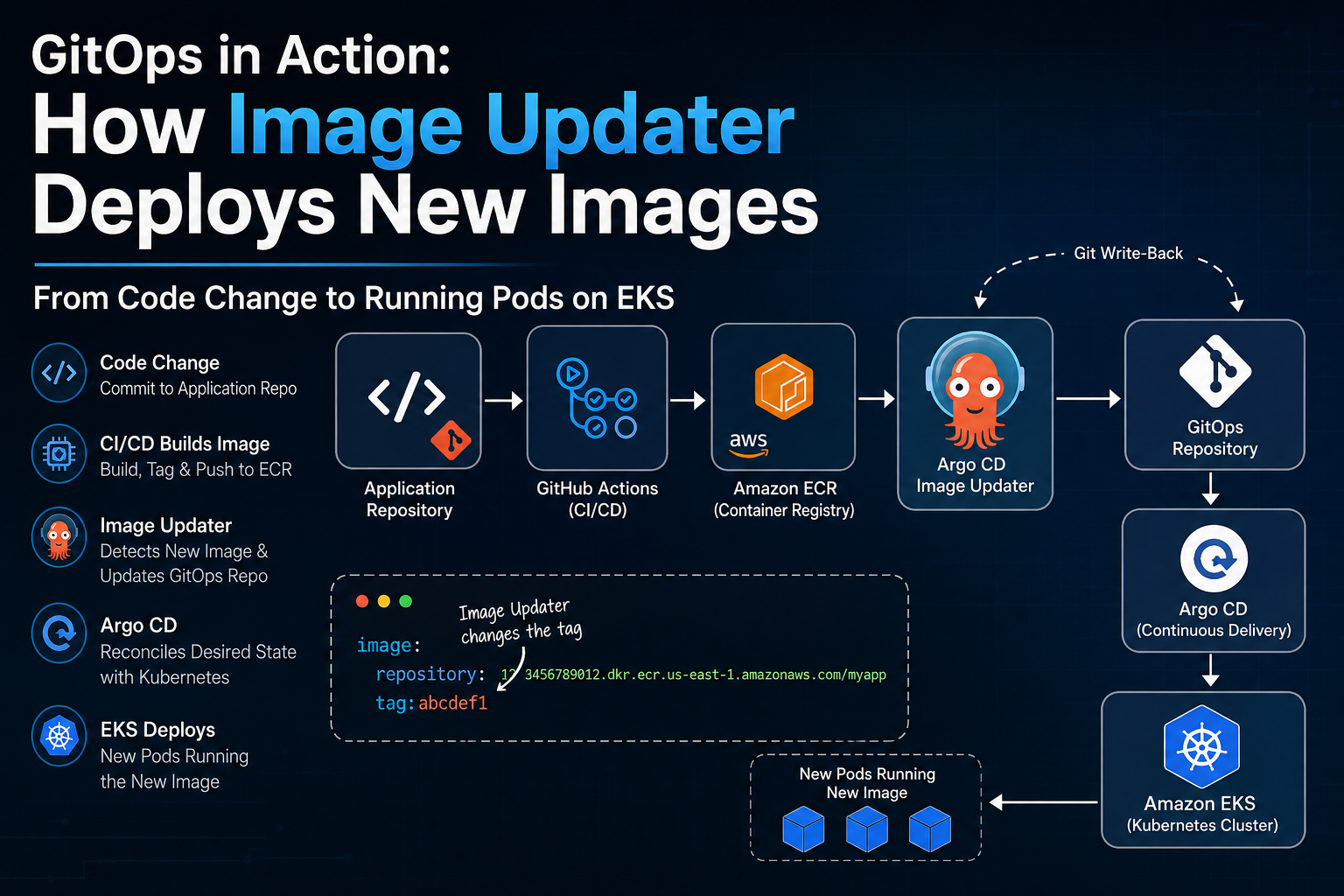
I have been working with Kubernetes, GitHub Actions, Helm, Argo CD and Terraform in my project.
At first, I understood what each tool was doing individually.
But I still had some confusion about the complete flow.
For example:
Who actually notices that a new image exists?
Does Argo CD pull the image?
Where does the new image tag get changed?
What exactly is GitOps reconciling?
What happens between Argo CD and Kubernetes?
What happens when a deployment needs to be rolled back?
Why do we even need two Git repositories?
So I decided to break the architecture down from the beginning.
The architecture I am using to understand this article is:
Application Repository → CI/CD → ECR → Image Updater → GitOps Repository → Argo CD → EKS → Pods
Note: My hands-on Kubernetes work has been primarily through a local Kind environment. I am using AWS ECR + EKS here as the cloud architecture I am learning and designing toward, so the concepts are easier to understand in a real AWS environment.
1. First: What Is GitOps?
The simplest way I understand GitOps is:
Git contains the desired state, and a controller continuously works to make the Kubernetes environment match that desired state.
Without GitOps, a deployment might look like:
Developer
    ↓
CI/CD
    ↓
kubectl apply
    ↓
Kubernetes
The CI/CD system directly interacts with the cluster.
With GitOps:
Developer
    ↓
Git
    ↑
Argo CD
    ↓
Kubernetes
The important difference is that Git becomes the source of the desired deployment configuration.
Argo CD watches that configuration and continuously checks whether the cluster matches it.
2. Why Two Git Repositories?
This was one of the things I wanted to understand properly.
In my architecture, there are two repositories.
Repository 1 — Application Repository
This contains things related to the application itself:
Application Repository
├── source code
├── Dockerfile
├── application files
└── CI/CD configuration
This repository answers:
What is the application?
Repository 2 — GitOps Repository
This contains the Kubernetes deployment configuration:
GitOps Repository
├── Helm charts
├── values
├── Kubernetes configuration
└── deployment configuration
This repository answers:
What version/configuration should Kubernetes run?
The application source code does not need to be copied into the GitOps repository.
Instead:
Application Repository
        ↓
      CI/CD
        ↓
   Docker Image
        ↓
       ECR
And the GitOps repository only needs to reference that image:
image:
  repository: <ECR repository>
  tag: 12345
So I think about it as:
Application repo = source of application code
GitOps repo = source of deployment desired state
That separation makes the architecture much easier to manage.
3. Developer Changes the Application
Let's start from the beginning.
Suppose I change something in the application.
I commit and push the change:
Developer
    ↓
Application Repository
The CI/CD pipeline is triggered.
In my architecture, GitHub Actions is responsible for building the application container.
4. CI Builds the Container Image
The pipeline builds a Docker image.
For example:
frontend:12345
The exact tag can be a Git SHA, build number, release version, or another identifier.
I prefer understanding image tags as version identifiers, rather than thinking of an image as simply "the latest one."
The pipeline then pushes the image to Amazon ECR.
Application Repository
        ↓
GitHub Actions
        ↓
Docker Build
        ↓
AWS ECR
At this point, the image exists in the registry.
But Kubernetes is not running it yet.
This is an important distinction.
5. ECR Stores the Image
Amazon ECR is the container registry.
It stores images such as:
frontend:12345
frontend:ABCDEF
frontend:98765
ECR's job is basically:
Store and serve container images.
EKS has a different job.
EKS provides the managed Kubernetes environment where my workloads run.
So:
ECR = stores images

EKS = runs Kubernetes workloads
They are connected, but they are not the same thing.
6. So Who Notices the New Image?
This was one of my biggest points of confusion.
Suppose ECR now contains:
frontend:12345
but the GitOps repository still says:
image:
  repository: <ECR repository>
  tag: 12344
Argo CD is watching Git.
Git still says:
12344
So Argo CD has no reason to deploy 12345.
This is where Argo CD Image Updater comes in.
7. What Does Argo CD Image Updater Actually Do?
Image Updater has a different responsibility from Argo CD.
It can:
watch configured container registries
find available image tags
evaluate the configured update policy
determine whether an image should be updated
update the configured image reference
So the simplified flow is:
ECR
 ↓
Image Updater
 ↓
Find candidate image
 ↓
Check update policy
 ↓
Update deployment configuration
One important correction to a common misunderstanding:
Image Updater is not responsible for Argo CD's desired-state-vs-live-state reconciliation.
That is Argo CD's job.
I think about the two components like this:
| Component | Main responsibility |
|---|---|
| Image Updater | Find/select a newer eligible image and update the image reference |
| Argo CD | Reconcile Git desired state with Kubernetes live state |
This distinction becomes very important when troubleshooting.
8. A New Image Existing Does Not Mean It Should Be Deployed
Suppose ECR contains:
12344
12345
12346
ABCDEF
Image Updater shouldn't simply say:
"There are new tags, let's deploy everything."
It uses an image update policy.
The policy determines which images/tags are eligible and how Image Updater should select one.
Depending on the configuration, strategies can include things such as:
semver-based selection
newest-build selection
alphabetical/numerical ordering where appropriate
tag filters
allowed tag patterns
other constraints
For example, if I only want versions matching:
v1.x.x
then an image with:
v2.0.0
may not be eligible.
So there is an important difference between:
A new image exists
and:
A new image exists that my update policy allows me to deploy.
9. Git Write-Back
Now we get to one of the most important parts.
Once Image Updater decides that a new image should be used, how does that change become part of GitOps?
There are different write-back methods.
One approach is to update the Helm values directly.
For example:
image:
  repository: <ECR repository>
  tag: 12345
Another approach is to use Argo CD source parameters through a file such as:
.argocd-source-<application-name>.yaml
The exact behavior depends on the Image Updater configuration and write-back method.
This file is not something that Image Updater always creates.
It is used when the Git write-back configuration is set to use the Argo CD source-parameter mechanism.
Conceptually, it allows Image Updater to persist an override for the Argo CD application's source parameters rather than modifying the original Helm values file directly.
So the important idea is:
Image Updater
      ↓
Git write-back
      ↓
GitOps repository
      ↓
Git commit
Git is still involved.
That's the part I initially didn't fully understand.
10. Why Does Git Write-Back Matter?
Imagine Image Updater simply changed Kubernetes directly.
Then we could have:
Git:
12344

Kubernetes:
12345
Now the declared configuration and actual cluster state don't tell the same story.
With Git write-back:
ECR
 ↓
Image Updater
 ↓
GitOps Repository
 ↓
Git Commit
 ↓
Argo CD
 ↓
Kubernetes
The deployment change becomes visible in Git.
That gives us:
history
traceability
reviewability
auditability
rollback possibilities
It also keeps the GitOps workflow consistent.
11. Argo CD Takes Over
Once the GitOps repository changes, Argo CD detects the change.
Now Argo CD performs its actual GitOps job.
It determines:
What does Git say should exist?
That is the desired state.
Then Argo CD gets information about the running Kubernetes resources through the Kubernetes API.
That is the live/actual state.
For example:
Desired state:
frontend:12345

Live state:
frontend:12344
There is a difference.
Argo CD identifies that difference and reconciles the application.
12. What Does "Reconciliation" Actually Mean?
This word gets used everywhere in Kubernetes, so I wanted to understand it rather than just memorize it.
The basic idea is:
Observe
   ↓
Compare
   ↓
Find difference
   ↓
Take corrective action
   ↓
Observe again
For example:
Git:
12345

Kubernetes:
12344
Argo CD detects the difference.
It applies the desired configuration.
Eventually:
Git:
12345

Kubernetes:
12345
The two states have converged.
That's reconciliation.
13. Argo CD Does Not "Send the Image to EKS"
Another important distinction.
Argo CD does not download the application image from ECR and send it to EKS.
Argo CD works with Kubernetes resources.
For example, it can apply a Deployment that references:
image: <ECR repository>:12345
Then Kubernetes handles the workload.
The simplified chain is:
Argo CD
   ↓
Kubernetes API
   ↓
Deployment
   ↓
ReplicaSet
   ↓
Pod
And when the Pod needs the container image:
Pod
 ↓
Container runtime
 ↓
ECR
 ↓
Pull image
So there are two separate flows:
Configuration flow
Git
 ↓
Argo CD
 ↓
Kubernetes API
 ↓
Deployment
Image flow
ECR
 ↓
Container runtime
 ↓
Pod
This distinction is extremely important.
14. Where Does EKS Fit?
EKS is managed Kubernetes.
At a high level:
Argo CD
    ↓
Kubernetes API Server
    ↓
EKS Control Plane
    ↓
Kubernetes Controllers / Scheduler
    ↓
Worker Nodes
    ↓
Pods
The Kubernetes API server is the interface Argo CD communicates with.
EKS manages the Kubernetes control plane for the cluster.
The worker nodes are where the application Pods actually run.
So saying:
"Argo CD sends the deployment to EKS"
is a little too vague.
A better explanation is:
Argo CD communicates with the Kubernetes API server of the EKS cluster and applies the desired Kubernetes resources.
15. How Does the Pod Get the Image from ECR?
Suppose Kubernetes now needs:
frontend:12345
The Pod is scheduled onto a worker node.
The container runtime on that node needs to pull the image from ECR.
That requires appropriate AWS permissions.
The exact mechanism depends on the EKS setup, but the important idea is:
The workload/node needs permission to retrieve the image from ECR.
Argo CD doesn't need to pull that image itself.
So:
Argo CD
   │
   │ Kubernetes configuration
   ▼
EKS / Kubernetes
   │
   │ image reference
   ▼
Pod
   │
   │ image pull
   ▼
ECR
This is another place where I initially mixed responsibilities between components.
16. What Happens During a Rolling Update?
Now suppose the old image is:
12344
and the new image is:
12345
Argo CD applies the updated Deployment.
The Deployment's Pod template has changed.
With the normal RollingUpdate strategy, Kubernetes creates a new ReplicaSet for the new Pod template.
Conceptually:
Deployment
   │
   ├── Old ReplicaSet → Pods running 12344
   │
   └── New ReplicaSet → Pods running 12345
Kubernetes gradually creates new Pods and removes old Pods according to the Deployment's rollout configuration.
Readiness probes and rollout settings help determine when new Pods are ready.
Eventually:
Old Pods → terminated

New Pods → running 12345
For stateless workloads, this replacement model works very well.
17. Stateless vs Stateful
This is another distinction worth understanding.
A stateless application should not depend on data stored only inside an individual Pod.
If the Pod disappears, another Pod should be able to start without losing important application state.
Durable state should normally live somewhere designed for persistence, such as:
a database
persistent storage
an external storage service
For stateful workloads, Kubernetes has mechanisms such as:
PersistentVolume
PersistentVolumeClaim
StatefulSet
depending on the architecture.
The important distinction isn't:
"Stateful means sensitive."
It is:
Does the workload depend on persistent state, and where is that state stored?
18. What If I Change the GitOps Repository Directly?
Image Updater is not required for every GitOps change.
This is important.
Suppose I manually change:
replicas: 3
to:
replicas: 5
in the GitOps repository.
Or I change:
CPU/memory
Service configuration
Ingress
environment variables
Helm values
Kubernetes manifests
Then the flow is simply:
GitOps Repository
       ↓
     Argo CD
       ↓
Kubernetes API
       ↓
      EKS
Image Updater isn't involved.
So there are two different paths.
Path A — Application image update
Application Repo
      ↓
     CI/CD
      ↓
     ECR
      ↓
Image Updater
      ↓
GitOps Repo
      ↓
    Argo CD
      ↓
      EKS
Path B — Direct GitOps configuration change
GitOps Repo
      ↓
    Argo CD
      ↓
      EKS
Both eventually reach Argo CD reconciliation.
Only the image-update path requires Image Updater.
19. Now the Important Part: Rollback
This is one of the reasons I like the GitOps model.
Suppose Git initially contained:
Commit A
image = 12345
Then Image Updater updates it:
Commit B
image = ABCDEF
Later we discover that ABCDEF has a problem.
The first thing to understand is:
Commit A did not disappear.
Git history still contains it.
So we have:
A: image = 12345
        ↓
B: image = ABCDEF
We can create another commit that reverses B.
git revert <commit-B>
Now the history becomes:
A: image = 12345
        ↓
B: image = ABCDEF
        ↓
C: revert B → image = 12345
This is useful because we haven't erased the previous history.
Argo CD sees the new desired state:
image = 12345
and reconciles Kubernetes back to that image.
20. Git Revert vs Git Reset
I initially had to separate these two concepts.
git reset
Reset moves the branch's HEAD.
Depending on how it is used, it can also change the staging area and working tree.
If used on already-published shared history and followed by force-pushing, it can rewrite history.
git revert
Revert creates a new commit that reverses an earlier commit.
For example:
A → B → C
If C reverts B:
A → B → C
but the resulting content is back to what B changed from.
For a shared GitOps repository, git revert is generally the safer approach for undoing an already-published change because the history remains intact.
That gives us:
auditability
traceability
clear change history
easier investigation
safer collaboration
21. GitOps Rollback Does Not Roll Back Application Source Code
This is another important point.
Remember that we have two repositories.
Suppose:
Application Repository
Version 10
and:
GitOps Repository
image = ABCDEF
Now I revert the GitOps deployment to:
image = 12345
I have not rolled back the application repository.
The application repository still contains whatever code is currently there.
I have only changed:
Which already-built container image Kubernetes should run.
So there is a difference between:
Application code rollback
Reverting application source code.
Deployment rollback
Changing the deployment to run an earlier container image.
GitOps makes the second one particularly straightforward when previous image references still exist.
22. What If the Old Image Was Deleted?
There is a catch.
Suppose I successfully roll the GitOps repository back to:
image = 12345
But someone already deleted 12345 from ECR.
Now Kubernetes can't pull it.
The GitOps configuration can be perfectly correct while the deployment still fails.
This is why image retention is part of a real rollback strategy.
A production system should consider:
image lifecycle policies
retention periods
immutable image references
rollback requirements
storage costs
A rollback is only useful if the artifact being rolled back to still exists.
23. Why Immutable Image Tags Matter
This is another lesson from the architecture.
Using:
latest
can create ambiguity.
If latest points to a different image tomorrow, the same tag no longer necessarily represents the same artifact.
Instead, we can use immutable identifiers such as:
8f3a91c
where the value represents a Git commit or build identifier.
For example:
Git commit:
8f3a91c

Docker image:
my-app:8f3a91c

GitOps:
image: my-app:8f3a91c
Now I can clearly answer:
Which exact application build is running?
This improves:
traceability
reproducibility
debugging
rollback
auditing
The exact tagging strategy depends on how the CI/CD pipeline is designed.
24. Common Misconceptions
These were some of the biggest things I had to clear up.
1. "Image Updater performs reconciliation."
No.
Argo CD performs GitOps reconciliation.
Image Updater handles image discovery, selection and image-reference updates.
2. "Argo CD watches my application source code."
Not necessarily.
Argo CD watches the configured GitOps source containing the deployment configuration.
3. "The GitOps repository contains my application."
Not necessarily.
The application source can remain in a separate repository.
The GitOps repository references the container image that should be deployed.
4. "ECR runs my containers."
No.
ECR stores container images.
EKS runs Kubernetes workloads.
5. "Argo CD sends the image to EKS."
No.
Argo CD applies Kubernetes configuration.
The container runtime pulls the image from ECR when a Pod needs it.
6. "EKS is just a server."
No.
EKS is a managed Kubernetes service, including the managed Kubernetes control plane.
7. "When a GitOps file changes, the old version is gone."
No.
The current file changes, but Git history still contains previous commits.
8. "Use reset to undo a production GitOps commit."
Usually not for a shared published change.
git revert is generally preferred because it preserves history.
9. "Rolling back GitOps rolls back application source code."
No.
It changes which deployment state/image is desired.
10. "Image Updater is needed for every GitOps change."
No.
Direct changes to the GitOps repository can go directly through Argo CD.
25. The Complete Picture
Now the whole architecture makes much more sense to me.
                 APPLICATION SIDE

Developer
    │
    ▼
Application Git Repository
    │
    ▼
GitHub Actions
    │
    ▼
Docker Build
    │
    ▼
AWS ECR
    │
    │
    ▼
Argo CD Image Updater
    │
    │ Git write-back
    ▼
GitOps Repository
    │
    ▼
Argo CD
    │
    │ reconciliation
    ▼
Kubernetes API
    │
    ▼
Amazon EKS
    │
    ▼
Deployment
    │
    ▼
ReplicaSet
    │
    ▼
Pods
    │
    │ image pull
    ▼
AWS ECR
The key thing is that there isn't one single component doing everything.
Each part has a job:
| Component | What it does |
|---|---|
| Application Git | Stores application source |
| GitHub Actions | Builds the application image |
| ECR | Stores the container image |
| Image Updater | Finds/selects eligible newer images and updates the image reference |
| GitOps Git | Stores deployment desired state |
| Argo CD | Reconciles desired state with Kubernetes |
| Kubernetes API | Interface through which resources are managed |
| EKS | Managed Kubernetes environment |
| Deployment | Manages the application rollout |
| ReplicaSet | Maintains the desired number of Pods |
| Pod | Runs the application container |
What I Actually Learned
The biggest thing I learned wasn't another command.
It was understanding where responsibility belongs.
When I see a new image, I should think:
Did CI build it?
        ↓
Does ECR have it?
        ↓
Is it eligible under Image Updater policy?
        ↓
Was the image reference written to Git?
        ↓
Did Argo CD detect the Git change?
        ↓
Did Argo CD reconcile successfully?
        ↓
Did Kubernetes create the new Pods?
        ↓
Can the Pods pull the image?
        ↓
Are the Pods actually healthy?
That gives me a much better way to troubleshoot the system.
Instead of saying:
"Argo CD deployment isn't working."
I can ask:
Which part of the chain actually failed?
And that is the mental model I wanted to build before moving on to the next topic.
A Few Interview Questions I Can Now Answer
Beginner
What is GitOps?
GitOps is a deployment model where Git represents the desired state of the environment and a controller such as Argo CD continuously reconciles that desired state with the Kubernetes cluster.
Why use two repositories?
The application repository manages source code and CI/CD, while the GitOps repository manages deployment configuration and desired state.
What is ECR?
A managed AWS container registry used to store container images.
What is EKS?
A managed AWS Kubernetes service used to run Kubernetes workloads.
Intermediate
What is the difference between Argo CD and Image Updater?
Image Updater finds and selects eligible newer images and updates the image reference. Argo CD reconciles the desired state from Git with the live Kubernetes state.
What is Git write-back?
It is the process of persisting the image update into the GitOps repository so that the image change becomes part of the Git-managed desired state.
What happens after Argo CD detects a Git change?
Argo CD calculates the desired state, compares it with the live state obtained through the Kubernetes API, and reconciles the difference.
Advanced
How would you roll back a broken deployment?
I would normally revert the GitOps change using git revert, allowing Argo CD to reconcile the previous desired image back into Kubernetes, assuming the previous image still exists in the registry.
Why prefer immutable image tags?
They make deployments traceable and reproducible and make it possible to identify and roll back to a specific artifact.
What happens if the old image was deleted from ECR?
The GitOps rollback can still point to the old tag, but Kubernetes won't be able to pull the missing image. This is why image retention is part of a rollback strategy.
Conclusion
Before working on this architecture, I knew the names:
Kubernetes. Argo CD. Helm. Docker. GitHub Actions. ECR. EKS.
But knowing the tools separately is different from understanding how they work together.
The mental model I am taking from this is:
Application Code
      ↓
Application Git
      ↓
CI/CD
      ↓
Container Image
      ↓
ECR
      ↓
Image Updater
      ↓
GitOps Git
      ↓
Argo CD
      ↓
Kubernetes API
      ↓
EKS
      ↓
Deployment
      ↓
Pods
      ↓
Image pulled from ECR
And if something breaks, I now have a chain to investigate instead of treating the entire platform as one black box.
That's the part I wanted to understand.
What I'll cover next
There are still a lot of topics I want to break down separately:
Kubernetes internals
Helm
Argo CD deeper
Vault
AWS infrastructure with Terraform
CI/CD
Observability
Security
Troubleshooting
I'll keep them as separate articles instead of putting everything into one huge post.